
Service desk & asset registry for internal IT teams
RANCAQ records every outage and request from your staff, assigns it to a named person, and counts the deadline using the Indonesian business calendar. Install it on your own server, or hand the running of it to us.
- Business-hour SLAsPublic holidays included.
- Portal and emailTwo front doors, one queue.
- Self-hostedOr run by us.
Your workspace is ready in minutes, no credit card needed. Prefer a guided tour? Request a 30-minute screen-share demo.

See RANCAQ at work in 6 minutes
Follow a day of an IT team at a fictional company: an employee files an incident report through the portal, the ticket is assigned with an SLA deadline, the cause is traced through monitoring, a service request goes through approval, and the IT lead reviews the availability report and audit trail. Every clip is recorded from the RANCAQ application with demo data.
- Portal & incident reports
- Assignment & SLA
- Monitoring & impact
- Request approval
- Availability report
- Audit trail
What is RANCAQ?
IT requests live in group chats, spreadsheets, and inboxes.
All of it is recorded somewhere — just not in one place. When somebody asks “how far along is the one from yesterday?”, the answer costs ten minutes of scrolling back through a conversation.
Those three questions — who is holding it, how far along it is, and when it is due — are the whole of this product.
The name comes from the Sundanese word rancagé: quick, nimble, and good at finding a way through.
That is the spirit we bring to every ticket:
Respond. Resolve. Improve.
Three questions, three answers.
Know who
Every ticket has an owning team and one named agent. Requests that need a manager's sign-off stop at the approval step until the right person approves them — rather than being forwarded in the hope that somebody reads it.
Know what
Outages are recorded as incidents. Service requests arrive through a catalog whose form already asks what actually needs asking, so no more one-line tickets that take three rounds of questions. The devices involved can be linked to the ticket.
Know by when
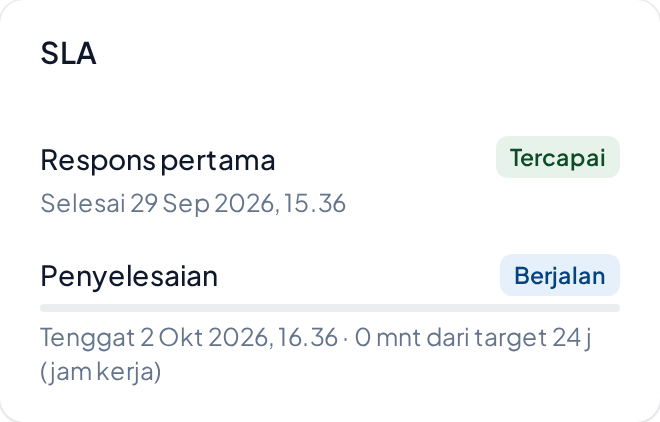
Response and resolution targets are counted in business hours, not wall-clock hours — Indonesian public holidays included. Tickets approaching their deadline are flagged at risk before they breach, not after.
Key features
Here is what runs in the product today. Every line names a mechanism you can ask us to go deeper on during the demo.
Tickets and queue
- Incidents and service requests
- An owning team and a named agent
- Comments and internal notes
- Filter, sort, and group the queue
SLA and work calendars
- Response and resolution targets
- Business hours and public holidays
- An at-risk flag before a breach
- Policies locked per version
Catalog and approvals
- Categories and service items
- A form per item
- Approval steps
- A fulfillment team per item
Asset registry
- Holder and handover history
- Status and warranty
- Location per site
- Linked to tickets
Portal and email
- A portal and catalog for staff
- Inbound email becomes a ticket
- Replies land as comments
- Outbound email through an outbox
Security and audit
- Row-Level Security per tenant
- Audit log with actor and time
- Attachments through signed URLs
- Roles and permissions per user
How tickets arrive
Two front doors, one queue.
Staff who are comfortable with a portal can open the portal: browse the catalog, fill in the form, then track their own request.
Staff who will never open a new application simply send an email as they always have. Their replies land as comments on the same ticket, and status changes go back out by email too — the conversation stays whole in one place.
The IT team sees both in a single queue.
Two paths, equally serious.
You can install RANCAQ on your own server, or we can install and maintain it for you.
Installed by you
- One Docker Compose file
- App, PostgreSQL, object storage, and a background worker
- Images build without outbound network access
- Data never leaves your network
What you handle yourself: version upgrades, database backups, TLS certificates, and monitoring.
Ask for the install guide- No servers to look after
Run by us
- Set up and upgraded by us
- Backups, monitoring, and recovery
- One address and the first admin account
What we handle: version upgrades, backups, monitoring, and recovery.
Ask about the managed option
Prices are discussed during the demo, based on the path you choose.
In the open
What is not here yet — and when we will build it.
We chose to write this down so you know exactly what you are installing today. Everything named on this page outside the list below already runs in the product; it is not a plan. Plans change, and we are not promising dates.
See the full roadmap- Knowledge base — solution articles that can be linked to tickets.
- Rule automation — assignment and escalation that run on their own.
- Reports and export — workload and SLA compliance summaries.
- WhatsApp channel — deferred until official API access is available.
See it yourself, in thirty minutes.
We will show you the queue, the SLAs, the catalog, and the asset registry on top of populated sample data — then you decide whether it fits your team. No slide deck.
A 30-minute screen-share demo. You do not need to install anything first.